
Understanding Estimate Fields and Totals
A reference for the fields and calculated totals that appear on an OperelliOS estimate, confirmed directly from the New estimate and estimate detail pages.
Who this is for: Owners or staff who need to understand which figures are customer-facing versus advisory.
Before you begin
Section titled “Before you begin”- You have opened an estimate’s detail page, or the New estimate page, at least once.
Observed fields and totals
Section titled “Observed fields and totals”Fields and totals directly observed on estimates in this capture:
- Customer — who the estimate is for. Required.
- Property — the service location tied to the customer. Required; the field is disabled until a customer is chosen.
- Scope of Work — optional description of the work to be performed.
- Attachments controls — upload documents or photos (files are scanned before download).
- Notes & Terms — prefilled from workspace Settings and editable per estimate.
- Line items — one row per Price Book service, showing the item/service name, description, quantity, unit price, and amount.
- Qty — an editable quantity per line item.
- Unit price / Rate — the Price Book item’s price at the time it was added.
- Subtotal — the sum of all line item amounts, calculated by the server.
- Pricing total — shown alongside Subtotal on the estimate detail page; in the estimate verified here it matched the Subtotal.
- Sales tax — a server-calculated amount with its rate shown in parentheses (for example, 7.00%), based on your workspace Settings.
- Grand total — Subtotal plus Sales tax; the customer-facing total.
- Status — the estimate’s current state.
- Margin guardrail — an internal panel labeled advisory only and not a customer quote input, showing a policy floor threshold and the server’s effective contribution margin.
- Advisory cost analysis — an internal-only panel labeled not used for the customer quote total, showing Gross profit and Gross margin.
The estimate detail page explicitly labels its pricing section SERVER-CALCULATED TOTALS, and the New estimate page states that the browser does not calculate official pricing. Both the margin guardrail and advisory cost analysis panels state they are advisory only and are not part of the customer-facing quote total.
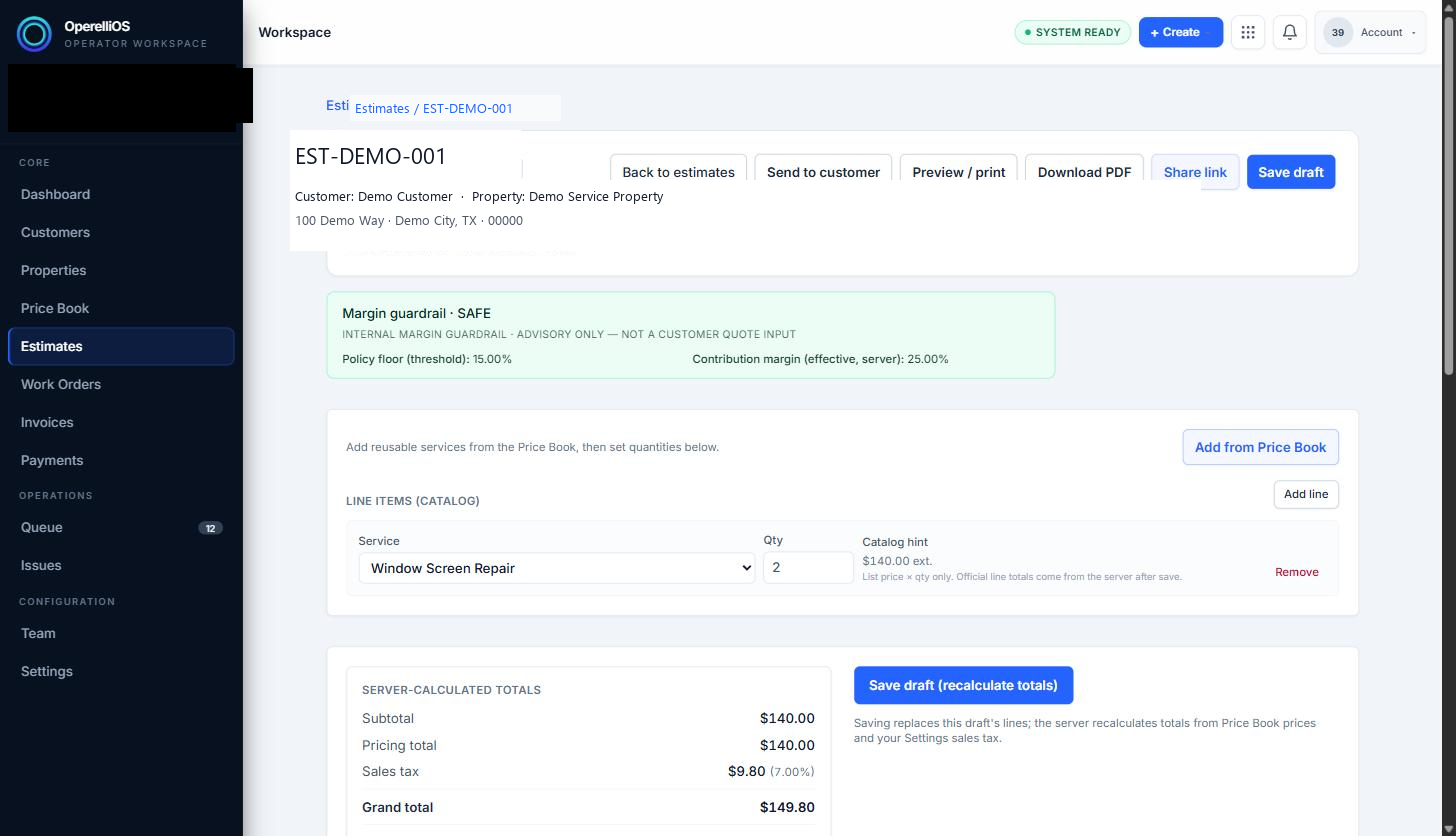
The margin guardrail panel is labeled advisory only, not a customer quote input.
Expected result
Section titled “Expected result”You can identify every field and total shown on an estimate and understand which figures are customer-facing (Subtotal, Sales tax, Grand total) versus internal-only advisory figures (margin guardrail, advisory cost analysis).
Warnings and notes
Section titled “Warnings and notes”- A user supplies governed inputs (customer, property, Price Book selections, and quantities); deterministic OperelliOS logic on the server computes every displayed total from those inputs.
- Catalog hints and advisory panels are not financial truth. AI does not own prices, taxes, discounts, margins, or totals.
- This article makes no tax, accounting, or compliance claims about the figures shown.
- A Discount field was not observed anywhere in this workspace during verification and is not documented here.