
Getting Started with OperelliOS
How to use the Launch Checklist on the Getting Started tab to complete initial workspace setup.
Who this is for: Owners and admins setting up a new OperelliOS workspace.
Before you begin
Section titled “Before you begin”You are signed in and viewing the Business Dashboard.
-
From the Dashboard, click the Getting Started tab next to the Dashboard tab.
-
Review the Launch Checklist. Each item represents one first-time setup task: setting up your company profile, adding your first customer, adding your first property, adding a Price Book item, creating your first estimate, sending your first quote, and recording your first payment.
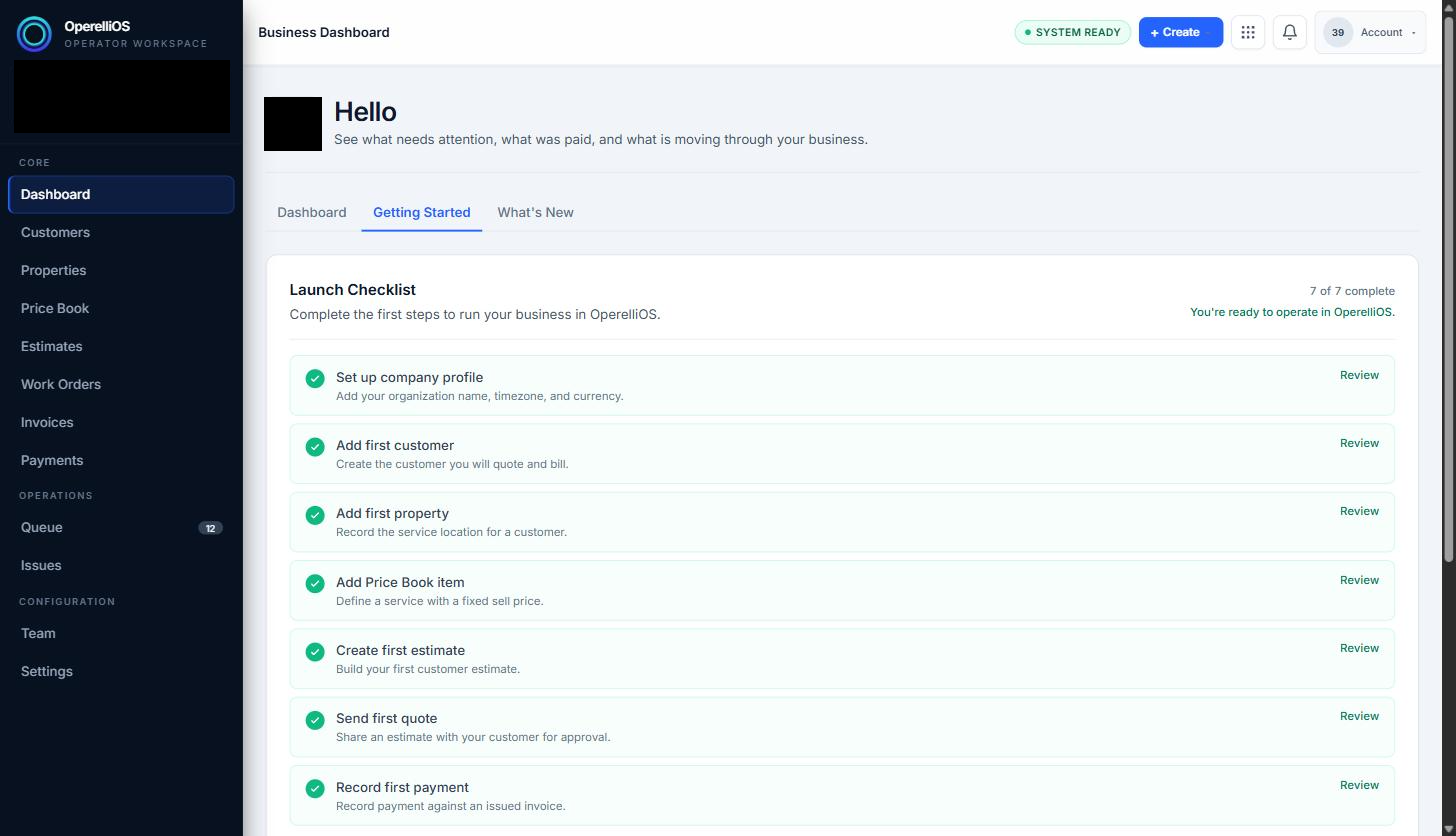
The Launch Checklist tracks first-time setup progress. Business name and avatar are redacted for privacy.
-
Completed items show a green checkmark. Click Review next to any item to jump to the related area of the product.
-
Below the checklist, an Explore Next section suggests follow-up workflows once setup is complete, such as reviewing your Price Book or inviting your team.
Expected result
Section titled “Expected result”You understand what the Launch Checklist tracks and how to jump to each setup task from it.
Common issues
Section titled “Common issues”On a workspace that already has data, some or all checklist items may already show as complete. The “Review” links route to the same modules regardless of checklist status.